Live A4 preview
Fill in the details on the left and see the printed page on the right as you type. No more fighting with Word tables.
Sunrise and sunset added
Pick the location and date, and the call sheet lists that day's sunrise and sunset times.
One link for the whole crew
Copy the share link into your group chat. Crew members can open, view and print it without logging in.
What it looks like
Log in and open it from your Grids dashboard. It looks like this.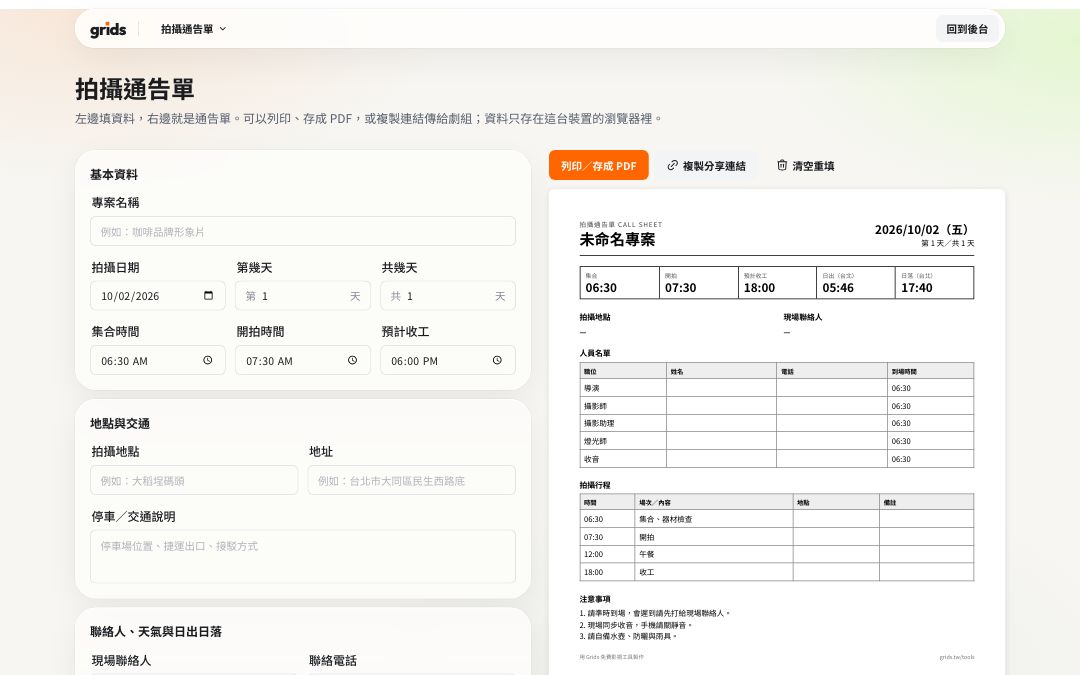
How to use it
Log in to Grids and open the call sheet.
Fill in the production title, date, call time and location.
Add the crew and the day's schedule.
Press “Share link” and paste it into your group chat, or press “Print” to save a PDF.
FAQ
No. The share link is read-only: anyone can open, view and print it. To make changes, they copy it to their own account.
In this device's browser. A share link carries the content inside the URL itself, so nothing is stored on Grids' servers.
All the tools are free and work on the Free plan. Logging in keeps the tools in the same dashboard as your Grids account, and stops features like remote control and sharing from being abused.
More free tools
- AaTeleprompterFreeFull-screen scrolling, mirroring, your phone as a remote
- S01Shot listFreeShot numbers, sizes and camera moves, with running time added up; printable
- NT$QuoteFreeCommon production items, tax and totals calculated; save as PDF
- 17:42Sunrise & sunsetFreeGolden hour and blue hour for every city and county in Taiwan
- 16:9Video calculatorFreeAspect ratio, file size and bitrate, timecode conversion